Commenting Out in PHP Versus HTML
Posted by Marty Dickinson on Jun 18, 2012
If you have something on your website that you want to remove, but you realize you might want to re-add it later, you might decide to “comment it out” instead of remove it altogether. Commenting out content just makes it easy to re-activate content instead of having to come up with the codes and/or image paths you used at one time. I always remember how to comment out on a standard HTML page. But, the one that I always forget is how to comment out in PHP, which is just a bit different.
For example, if I have this sentence:
I really wish I could remember how to comment out php versus html code.
If this was in standard html, all I would have to add would be:
<!– I really wish I could remember how to comment out php versus html code. –>
But, if my website is produced in WordPress, the code is produced with PHP instead of straight HTML. So, the code is a little different.
<?php /* I really wish I could remember how to comment out php versus html code. */ ?>
Pretty simple there. Give it a try sometime on your own. Then, next time you want to remove something from your website temporarily, you’ll know how to comment out PHP versus HTML and you won’t even have to contact your webmaster or designer to make the change for you.
Improve Internet Marketing Results for Your Business or Company with These 7 Tips
Posted by Marty Dickinson on Oct 29, 2009
Either have your own business or work for a company if you are reading this post. You’re beside yourself why your Internet marketing efforts have produced stagnated results. You’ve spent hours building followers on Twitter but no one seems to care about what you tweet. Your lead generation has come to a screeching halt and product sales through your shopping cart are even worse. Is this what you can expect for the remainder of the year?
No! Stop the bleeding right now.
Here are 7 tips to give some much needed chest compressions to your dying Internet presence:
1. Look at Your Website for the First Time – If you could suddenly step out of your body and become 1,000 visitors to your website, what would you “expect” to see? Does your website offer what your visitors expect? Be honest and then add the missing pieces that come into mind. Does a strong “upper right quadrant” (URQ) exist on your website? Do you top navigation buttons inspire people to take action by clicking on them? Do you provide content of value on your website that doesn’t always throw the hard sales pitch? Are you absolutely positively sure that a visitor knows exactly what they are supposed to do next after they have found what they’re looking for on your website? I’ll ask it again: Are you really sure?
Why try for 100,000 visitors a month to your website if you’re not able to convert the visitors you do get to leads or customers?
2. You Get One Click – In Steve Krug’s book, Don’t Make Me Think, he gives a great walk through of website usability and how websites should be constructed. Read his book, but at the same time, think to yourself “I lose 50% of my visitors every time I make them click on anything.” So, if you want to only make one change to your website, add a quote form or contact form to your most important product or services pages…and especially to any landing pages where you are running pay-per-click ads to. If you only get a single click, you want that to be a prospective customer completing a quote form and “clicking” the submit button.
[SWF]http://www.websitewaves.com/pics/123-banner_com_866382.swf, 500, 100[/SWF]
3. Purpose Your Content - Don’t just add a page to your blog or website for the heck of it. Have a direct purpose for everything you add. If you’re going for getting more pages indexed on Google, for example, find what people are searching for related to your industry or topic first, and then write your article or page to speak to those visitors. Use free tools like Google’s free keyword search tool or Word Tracker’s free search tool to find search volume for any given phrase. These tools will also act as a thesaurus to give you ideas of other related phrases people are searching for.
After all, it’s a lot easier to be hit by a car if you go out into the street! Create your content for what your visitors are searching for.
Now, you don’t always have to produce content only for Google search. This post, in fact, doesn’t have a chance in hell of getting in the top 10 search results with a giant keyword phrase “improve internet marketing” as my leader phrase. And, it’s not worth my time to go through the heroics of what it would take to make that happen. But, that’s okay, because my intention is to promote this particular post on Twitter, Linkedin, Facebook and a variety of other social networks where the headline itself will hopefully be intriguing enough for people to want to pay a visit. After all, Google is only 1 of more than 100 ways to get traffic to a website.
4. Expand Your Traffic Options – Once you have tested and tweaked your website to increase your conversions, evaluate all the ways to increase traffic to your website. My most downloaded white paper on my company site is called 101 Realistic Ways to Get Traffic to a Website. It’s a 30-page free download that walks you through all the traffic generators I know of. What’s better is that they’re all sorted by cost, ease of implementation, time to implement, and ROI. You can make your entire Internet marketing plan for the next two years using that single document.
5. Get More Involved – When a struggling business owner, author or speaker comes to me saying their website is not performing to their expectation, my first question is 1, how many leads or sales did you get last month. That one is easy. They usually say zero. Next I’ll ask, how much visitation did you get last month? Almost always, “I don’t know” is the answer. Knowing the answer coming next, I still ask it…”Can you make changes to your own website?” A long pause usually occurs and then I hear, “no” as the answer.
If you still have to send even minor text changes to your designer to be added to a page, right now is the time for you to take steps to change that! Joomla is a free content management system that designers like because of its design flexibility and visual editing features. Programmers prefer Drupal for its power and clean code…but you’d better have a programmer in tow if you go with that system. My personal favorite is WordPress. At the Thrive Internet Marketing Super Conference in Chicago, I’m going to show you some uses for WordPress that you might not even imagine are possible! Even if you’ve heard of WordPress before, you haven’t seen anything like this! It’s the new evolution of websites.
6. Perform Mind Magic – It seems easier to introduce this topic using those words than it is to tell it like it really is. People get all bent out of shape when I say “Spy on your competition.” So, think of it as performing mind magic instead. Truth is, in this day and age, you really need to keep up with what your competition is doing. One great tool for doing this is Keyword Spy. There you can plugin your competitors domain name and see all (well, most anyway) of the organic search phrases that come up on Google pointing to their website. You can also see if they are running Google AdWords campaigns as well as the wording they’re using in those AdWords and how much they’re spending per month.
This is by far illegal. It is simply market research. But when you use that information correctly to apply to your own website and promotions, people will think you’re performing some kind of “mind magic.” So, that’s what you want to tell them…or, risk being accused of spying!
7. Create Something Memorable – On my HereNextYear site, you’ll see my mascot. It’s a picture of a dog. It’s not my dog. It’s just a picture. The picture has a name. His name is “Action.” The idea behind Action is that I can teach you everything I’ve learned about increasing leads and sales on the Internet, but unless you’re willing to “take Action,” it’s a waste of time for both you and me.
When I present that at seminars and workshops, people simply go CRAZY! It’s a great opener and it is very sticky, meaning, it sticks in peoples’ minds for a very long time. I get calls from people months after they see me speak. They’ll say, “Marty, I don’t remember what you do, but you’re the guy with the dog, right?”
It’s memorable. It’s sticky. It sells. Action sells! Action even has his own Fan club on Facebook (which you are welcome to join here)! And, I take “Action” in everything I do and everywhere I go.
What character can you create that is related to your business that can be sticky and memorable like Action is to my business?
So, these are just a few of the things I’ll be covering in much more detail at the
Thrive Internet Super Conference in Chicago. Why not join me there on the 19th and 20th? I’m sure it will be worth your while.
If you’re just not into going to seminars anymore for fear of getting those dreeeeeaded sales pitches, well, checkout my recent blog post where I give you 101 reasons to attend a seminar. They each far outweigh any fear you may have of getting pitched.
Hope to see you there in Chicago!
Ways to Add Line Breaks to WordPress Posts and Pages
Posted by Marty Dickinson on May 25, 2009
Here are 5 ways I’ve found so far for adding line breaks into WordPress posts and pages. WordPress is widely known for handling some of the most complex HTML issues and making them easy for even the most novice and non-technical. But, there are a few quirky things about WordPress that should be simple and are still tough to accomplish. One of those is how to add line breaks to WordPress posts and pages.
If you’re in Visual view while adding a new post, for example, you could start typing away and just hit enter. Many times that will work. However, when you add an image in your post, and the image isn’t wide enough to force your words to the next line, you might want to add a blank line. Often, the enter key will not help in this situation.
Or, if you use a headline, such as an <h> tag, how can you get a space between the H tag and your text?
So, this post is going to be an ongoing listing as I hear more options about how to add line spacing between one section and the next.
1. style=”margin-bottom: 1em” – This tag can be used inside any tag or such as <p> or <h>.
1em stands for 1 line spacing. So, if you want 5 lines of blank space, just make your code <h3 style=”margin-bottom: 5em”>
2. style=”clear: left;” – When you need to get text below an image, you can always use the image settings to manage how text surrounds images. But, HTML can have a mind of its own. So, if you try the settings in your image manager and still text is wrapping to the right or left of the image, use the text or paragraph here <p style=”clear: left;”>
3. css file – For either of these, you could make the line spacing automatic every time you add an tag or text at the bottom of an image. These statements would need to be included into your css file.
4. Disable WPAUTOP – Using this feature would completely disable any automatic formatting of paragraph breaks or line breaks. Programmers love this idea because it gives them full control over HTML code appearance. The drawback is that you have to manually insert any paragraph or line breaks or your paragraphs will just run together into a big mess or words. Here’s a link for how to disable WPAUTOP
5. Add TinyMCE Advanced plugin – This plugin works for some and not for others. So, it’s just one of those things you have to try if you have WordPress version 2.7 or higher. Once installed, go into the “settings” area for that plugin and check a box that stops WordPress from stripping your <p> and <br/> commands. Search your WordPress plugin directory for a free download of TinyMCE Advanced.
6. Add Blank Image – A rather old-school way of adding your own spacing would be having a transparent image the width of your post page and the height being the desired space you want between your two lines. Use this method if the others don’t work.
Have other methods for adding line breaks to WordPress posts? Enter your solution in comments.
I will be adding more options as I find more.
Web Marketing All-in-One Reference Guide for Dummies is In-Stock at Amazon
Posted by Marty Dickinson on Mar 12, 2009
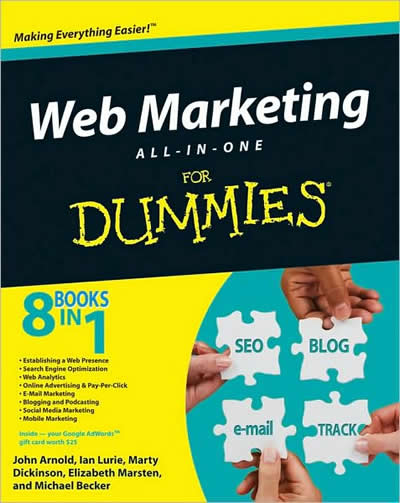
My co-authored Web Marketing All-in-One Reference Guide for Dummies book is officially in-stock at Amazon. And, even though I haven’t seen the live version come in quite yet, it sure is exciting to know that it’s close to being in stores everywhere! Next week I will be interviewing my fellow co-authors about their book chapters and hope to get a few nuggets showcasing the most secret Internet strategy techniques.
Here’s a link to the book on Amazon for you to order right now!
As a SPECIAL LAUNCH BONUS, I’m offering 1 month access to my Level 2 membership program featuring the Internet Marketing Organizer tool. All you have to do is send a receipt to me by email at Marty@HereNextYear.com so that I have proof you’ve actually purchased the book and I will hook you up with a username and password to access Level 2. That’s a value of $141.00 and is my special gift to you for supporting our book project. [UPDATE: We now have more than $700 in bonuses available during our week-long book launch March 23-28, 2009!! Visit WebMarketingBook2009.com for details.]
Web Marketing All-in-One Desk Reference for Dummies Due March 2009
Posted by Marty Dickinson on Aug 26, 2008
I finally came out of my cave Monday afternoon after finishing the required 70% complete deadline for my portion of the Web Marketing All-in-One Desk Reference for Dummies book due in bookstores everywhere March/April 2009 (Wiley Publishing, publishers of the “For Dummies” books). John Arnold of Constant Contact (E-mail), Ian Lurie & Elizabeth Marsten of Portent Interactive (SEO, AdWords, Social Networking, blogs), and just added, Michael Becker (Mobile Marketing) from Iloop Mobile (personally can hardly wait to see what he’ll be adding about THAT very hot topic!).
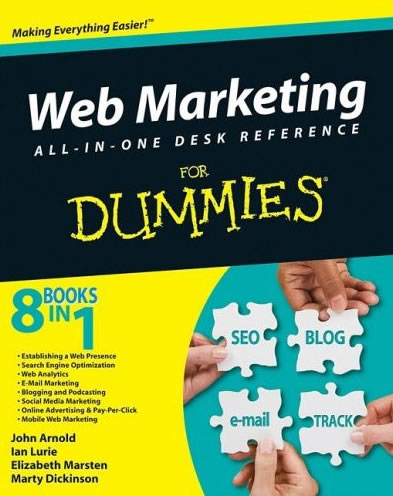
It is a true honor to be sharing pages with these industry experts as we make our contributions to what I believe will be the most talked about Internet strategy book in years.
When I was asked what I would like to write about, I immediately said, “the money part of course” So, I get the first section of the book which will be covering topics like:
- Converting more visitors to paying customers
- Writing promotional copy that sells
- Shopping cart setup
- Finding and promoting affiliate products
- Starting and building your own affiliate program
- Joint venturing
- Which website type is the best for you
- Design components that sell
- Hiring helpers so you’re not doing everything yourself
More coming on this topic coming soon but I have to mention that something else has happened in the process of writing this book, which is now listed on Amazon by the way. I think I’ve had more leads for business in the past two months than the first six months of this year combined. How could that be? I haven’t been doing anything differently in my promotions than usual. Must be the book. Just by telling people about it, people are talking about it. The book isn’t even out yet and people are talking about it. We’re not even finished writing it yet and people are already talking about it. Strange but true.
Big Seminar Oct 3-5 2008 is a Must Attend
Posted by Marty Dickinson on Aug 22, 2008
Whenever the conversation turns to Internet Marketing one name comes up more often than any other name…Armand Morin. Armand is the Expert that the experts turn to and watch for direction.
I first met Armand in 2000 at a conference where he was NOT a speaker. Yes he too was once an “attendee” sitting in an audience learning form other speakers. And, that’s my point. People are always asking me, “Marty, HOW do you learn this Internet marketing stuff?” And, I tell them how much I spend a year on attending conferences and buying educational materials.
In the BIGinning
The BIG Seminar is the place where it all starts. It’s the only Internet marketing conference I attend EVERY time. Why? Because Armand only picks truly cutting edge presenters and gives them plenty of time to deliver tons of content I usually begin implementing throughout the weekend of the conference! Yes, I don’t even wait until I get back to start. I’m too energized to wait! While others are partying at the bar, I’m up until 3am trying out what I learned on my laptop.
Who Attends Big Seminar
The audience is made up of about 40% that are brand stinkin’ new to the web, but you could be sitting next to a multi-millionaire who has dozens or even hundreds of websites. And, that’s one of my favorite things about Big Seminar. You just never know who you’re going to meet.
Money Tight?
If you are strapped for cash, Big Seminar is the ONLY conference I would recommend you attend coming this October 3, 4, and 5 in Atlanta Georgia. And, if you can’t afford a couple thousand dollars toward your own education, you NEED to attend more than others! It’s the only conference I can honestly say pays for itself, for me, within the first week after the conference. It’s that good.
Now, let’s be real…
Big Seminar has an affiliate program. That means if I refer others to attend, I get some of the bucks. Basic sales and basic Internet stuff. And sure, when you register, of course I want you to Register Here through my affiliate link. But, there’s something more…
I always offer to my clients that when they attend the Big Seminar, if they’ve registered through my link (which they always do), they will get to meet with me as a small focus group on Friday and Saturday night in a private meeting room where we can go over what was covered during the day. I answer any questions they have and it really helps to have someone to put everything together into a summary of steps and fill in the blanks. Then, when we get back (because I always fly home on late Sunday afternoon), we schedule a conference call to go over what was covered on Sunday.
See, going to something like Armand Morin’s Big Seminar is not only overwhelming from a content and learning standpoint, but just the sheer experience of it all requires some savvy to navigate through. After all, you’re in an audience with typically 500 or more people. Just meeting the one right person you needed to meet could change your whole life…and your income! But, how do you navigate through Big Seminar?
You need a guide. Someone who’s been there. Someone who knows most of the presenters, staff, and a good chunk of who will be in the audience too. Let me be your guide.
Not Sure Yet?
One of Armand’s trademarks is having phone interviews with the speakers leading up to the conference. Would you like to sit-in as Armand talks with other experts and they discuss their Internet Marketing Secrets?
You can…and it’s free.
Every Tuesday and Thursday up until the BigSeminar Armand will host a FREE training call with one of the expert Faculty from his upcoming Big Seminar. They will discuss what they’re doing on the Internet and how they do it.
The calls are FREE…click here now to register for the calls.
Calls times, phone number Passcode etc. will be immediately sent to you via email.
In Summary:
If you’re wondering where all those Internet marketing folks go to learn what’s new and what really works to build a business and increase sales, Armand’s Big Seminar is the place to be. I hope you’ll join me and take me up on my invitation to attend the after-hours meetings to go through things. After you register, be sure to let me know. You can contact me through the Ask Marty contact form.
And, I hope to see YOU at Big Seminar October 3, 4, and 5 2008 in Atlanta!
Best Online Chat Software
Posted by Marty Dickinson on Aug 22, 2008
Online chat is not only the communication mode of the future it’s the sales conduit of “NOW!” Sure, it’s great to be able to offer 24/7 support to your customers but the right online chat program can also allow you watch visitors as they arrive on your website. You can actually watch them migrate from page to page. Then when they get stuck, you can send them a little pop-up message that invites the to talk to you online.
At first thought, this is scary! But, once you get a feel for your audience and the questions they’re asking, it’s really not that hard to guess the right way to approach your website visitors. Do it right and it pays off!
The online chat software I use on multiple sites I own is not free, but is somewhere around $100 a year, which is a small price to pay for what they offer….
-24/7 online chat support (Ilene knows her stuff!!)
-customization of chat window
-private labeling (meaning your visitors will think it’s YOUR program)
-customizable exit questionnaire (which is a great way to increase opt-ins to your list, if done properly)
-a system worth paying for!
Actually, when I signed up for this system, I bought two accounts.
1) for my paying clients so that they could reach me most times of the day or night (whenever I had my computer turned on) and
2) for visitors checking out my main websites. And, I can assign any of my helpers to monitor chat requests.
Online chat has reduced my email from clients by half and has increased my sales by at least 200% as I’m able to answer questions immediately as surfers have them.
Discover the Online Chat system I use daily and highly recommend.
What Fonts Can I Use Besides Arial?
Posted by Marty Dickinson on Aug 5, 2008
The question “What fonts can I use besides arial on my website?” came in from one of my “Small Doses” subscribers where I offer Internet marketing and business growth tips…well, in small doses. Thanks for the question and here’s the answer. The font types you choose for the text areas of your website should be whatever font type you KNOW for certain your visitor’s computers have the capability of displaying on their screen the same as you intended when you wrote the page on your screen. Unfortunately, you never know for sure.
Said another way, stick to fonts that are considered “safe.” My favorites are Trebuchet and Verdana when I want to be “different” but stick with “arial” when I want to be professional because it’s safe.
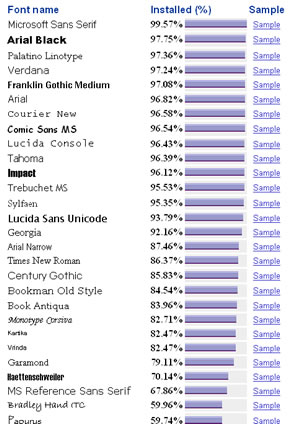 Here’s a great resource to use when trying to identify which font is best for your site. The Installed (%) means what percentage of computers have that particular font installed on them.
Now, just because Microsoft Sans Serif is right on top of the list doesn’t mean that would be the best fit for use for your website. But, it does show why Arial Black, Verdana and Arial are so widely used–because people have come to realize that most computers have those fonts loaded.
This display also shows that Garamond might not be such a predictable choice, even though many web designers choose it.
If you must use a font that is not high on the list, that’s your opportunity to use the font in an image instead of the main text of the site. That way, any computer will still be able to see the wording the way you intended it to be seen.
Don’t go too overboard with using images to display your text, however. You need a lot of text on your pages so that search engines will be able to evaluate your content for placement.
Interesting how we have lots of choices when it comes to using fonts besides the common Arial 10-point. Then again, maybe we don’t have as many choices as we thought. Anyway, just thought you’d like to see this chart. Have a great day!
Free WordPress Blog Themes | Free WordPress Blog Templates
Posted by Marty Dickinson on Jul 21, 2008
 Here’s a free WordPress Themes and WordPress Templates site that I haven’t seen before. The themes and templates for WordPress blogs are quite more artistic than usual. Certainly bettet than the traditional themes found at WordPress.org. From what I can see, they’re all free as well.
With that said, let’s think for a moment about what makes a WordPress blog theme something that will add to your bottom line. I mean, you wouldn’t want to change your current WordPress blog theme to something new just for the sake of being something new, would you? Of course not. Think of all of those frequent readers that would just get thrown off. Consistency is vital on the web.
When you look at the top 100 blogs at Technorati.com it’s pretty easy to see some similarities among themes.
2008 Olympics Website Reviewed
Posted by Marty Dickinson on Jul 7, 2008
The 2008 Olympics website will be one of the most visible websites in the world for the next two months. You would expect their website to also be an Olympic example of what a website should look like, feel like, sound like and smell like. This purpose of this post is to examine the qualities of the 2008 Olympics website in hopes that the rest of us can model after what their developers have done well and run as fast as we can in the other direction from repeating the mistakes they’ve made.
On a scale of 1-10, 10 being best, I’ll give it a vote of 5. Why such a harsh grade? Well, let me cover some good things first. There are several things I think they’ve done a good job with for the site:
1. The immediate question is answered as to exactly “when” the Olympics will be held. I’ve had 4 people ask me that over the past week, so the date is not something people know.
2. I like their use of the Upper Right Quadrant (URQ) where they provide links to alternate languages of the site, their tagline stands out “One World One Dream” and gives me a little entertaining countdown which is at today “31 days to go.” In the URQ also answers another question for me as I’ve always wondered what the temperature in Beijing China is. And then there’s a search box for me to type just in case the navigation doesn’t give me what I’m looking for.
3. I sort of bypassed the Flash rotation (which I’ll come back to in a moment) and went to the left navigation which is simple and categorized, pretty easy to follow.
4. The overall look of the site is welcoming and entertaining. I like the use of green and blue which sends a warm, let’s-unite-the-world kind of message.
Here are several areas where I believe the site could “still” be improved:
1. I’ve looked at this site on various screen resolutions and I just feel that the Ticketing Info section on the mid-right column should be more pronounced and part of the URQ. Buy Tickets Now would be much more appropriate.
2. Maybe I haven’t had enough coffee yet, but the scrolling images in the middle of the page under the Olympic Q&A completely missed me. Only after I spent 15 minutes on the site looking at other things did I discover you could mouseover them to discover they were links to event descriptions.
3. If people are not coming to the site to find the general date, or to buy tickets, they’re wanting to know what the schedule of events is. This is another item that should be right in the forefront of the site. This can be found under “Sports & Venues” on the left nav…but it doesn’t say “Events Schedule” until you get into that section.
4. Okay, so, the Flash part. Um, guys, you have video lower right on the site. Why not just use the video clips so that people see them right away when they land on the home page?
5. The Olympic Q&A section is worthless. They should remove it entirely or build it into a real Q&A that has potentially hundreds of questions answered. If I was even thinking about attending the olympics, I would have tons of questions.
6. The banner photo of the China girl scared me! It looks like something out of an old wax museum movie. There are far more beautiful photos of China girls you could find for that banner. Don’t scare me like that!
7. Finally, there’s not enough emphasis on getting me to “register.” You’ll see the register/login next to the search text box. But, there’s no reason mentioned for me to register. To even get me to click on that register link, they need to tell me why I should. Othewise, I’m kinda lost.
So, there’s my justification for giving a 5 for a review of the 2008 Olympics website to be held in Beijing China on August 8-24, 2008. Many important pieces have been added to give the site its entertainment value and ease of navigation and welcoming warmth. But, several things as mentioned could be added to get more results. We’re still in July at the time of this post. Hopefully they will make some changes by the time I start looking for event schedules.
How would YOU review the Olympics website? Give it your rating 1-10. Just fill in a comment below and make sure to put a link to your website or blog.