This Product Should Be in Your Store
Posted by Marty Dickinson on Apr 1, 2015
If you have a business supply store, retail outlet or catelog, I highly recommend you consider this product, CloudNet360.
Best DNS Testing and Ping Tool
Posted by Marty Dickinson on Nov 6, 2014
Here’s what I think is the best web-based truly free DNS testing website and ping tool there is.
Free Web-Based Website Scanner for Worms and Malicious Code
Posted by Marty Dickinson on May 10, 2014
Many misleading websites out there that show up in google when searching for worm scanners and malicious code scanners, but not too many out there for websites. Most of them have software to be downloaded. I needed a quick web-based tool so tried a few and settled on this one.
Best Domain Name Affiliate Program
Posted by Marty Dickinson on May 26, 2010
I participate on a lot of industry forums where web designers, seo guys, AdWords campaign managers and other Internet service providers hang out and talk about a variety of topics. Year after year I see the same question come up where someone just getting started with one of these businesses is looking for a domain name affiliate program.
In case you’re not sure what an affiliate program is, it’s a way for you to become a virtual salesperson for someone else’s product or service. Meaning, you get paid sales commission whenever you make a sale but you don’t have to ship any product or do any support on the back-end.
If you have clients of any kind, you should be recommending a way to them register domain names. Many people use GoDaddy or Network Solutions or one of thousands of other domain name registrars, for example. Not all domain registrars have affiliate programs. Some do, but they have heft up-front charges or pay next to nothing commissions or are just plain shady somehow.
About every six months I poke around the web to find the latest and greatest domain registration affiliate program that might meet or exceed my stringent criteria of endorsement. And, every year, I come back to the same system I’ve used since 2003 and have recommended to who knows how many thousands of business owners, authors and speakers.
Here are my qualifiers of what I look for in an affiliate program for domain names:
Proof of Residual Payment – If I’m going to put my effort into promoting anything online, I want to be assured I’ll be paid for my efforts and I want my commissions to be automatically deposited into my bank account. And, I want those payments to be recurring by the month and year.
The one I use: Pays every month right into my bank account and every time a customer renews a domain name, I get another commission payment. These add up over time and every year those renewals just double! Never has a payment been missed; it’s always automatic and I can cross reference my payment with online reports down to the day of the transaction.
Proof of Domain Name Rights – I remember a client that had some hosting company in Australia that gave them a free domain name with their website hosting. After repeated downtimes, the client decided to change their hosting. Their Australian hosting company told them to go fly a kite! Any system I recommend to others has got to give the client rights to their own domain name.
The one I use: It is your domain name, registered in your name, controlled by you when you login to your own account.
Proof of Process – The system has to “work” and be easy to use by even my most non-technical clients. After all, the domain names will be registered in their names by them.
The one I use: Yeah, well, it has a bit much on the upselling attempt which might get a little in the way of usability for the customer, but even when the company upsells one of my referrals, I get even more commission for the sale.
Proof of 24/7 Support - Nothing is more irritating than having a domain name registrar company that only supports your domain names by email. There are just some times when you have to pick up the phone and call someone, y’know?
The one I use: When the support department answers the phone, the person on the other end is always English speaking and answers in the voice of the name I gave my domain name registration website, which is “U Own it Domains.”
Proof of Involvement – I want the affiliate system to allow me to be involved. If I recommend the domain name system for someone to register domains and then they do so, I might get a call someday with a question on the operation of the system. Say for example, the customer cannot get logged in and for whatever reason they don’t see the support phone number on the registrar’s website. They’re probably going to track me down and contact me as the recommender (yes, this has happened before). I need an administrative area where I can login as the affiliate and find that customer and at least get access to their customer number so I can help them get support. This demonstrates to the customer that I am involved in the process and the product. And, I will have a devoted domain registration customer for life as a result.
The one I use: I have a simple and secure login admin console to login to that gives me all kinds of reporting capability to help my customer when I need to.
Proof of Longevity – A new domain name company that just started up yesterday is not one I’m going to put my trust in being around next year. Most of my domain names I register for 5 years or more. I can’t afford to have some bigger company buyout some little registrar company I’ve signed up with only to have their entire process, back-end management area, support methods and pricing change on me mid-stream. It’s just not one of those things I want to worry about.
The one I use: GoDaddy uses the same technical backbone. Think of GoDaddy as a big giant affiliate for this company where the actual machinery is stored to make the domains happen. That’s some pretty big longevity factor there!
Proof of Protection – If someone is trying to steal my domain name, I want to know about it and I want to know that my registrar has protocols in place to identify when domain thieves are at work.
The one I use: You can hide your domain name identity from public view with some slightly higher paying costs for each domain and if anyone tries to steal your domain by transferring it, you will get email notices which you can de-authorize and keep the rights to the domain name.
Proof of Competitive Pricing – If I’m promoting someone’s domain registration system, I should get a discount on domains I want to buy for myself. Plus, people I refer to the system should see that my pricing is competitive too. Which brings me to my next point…
The one I use: Sure, there are systems promoting $3 domains now….but you have to get a hosting account with them or buy other services for a certain amount. Prices with my system are low enough to be competitive and stand on their own.
Proof of Partnership – As an affiliate, I need to be able to prove to my clients and people I recommend the system to that I am in affiliation with the domain registration company. The way that happens is by the affiliate company supplying a website and purchase process that has my name on it; a way for me to integrate my name and my message on their website. Think of it as “co-branding” where both the registrar and I share ownership in a website.
The one I use: Allows me to have a custom header image. So, I can add anything I want. My logo, my name, the affiliate company, whatever.
Proof of Customization – Finally, I need to be able to get into that website offered by the domain name affiliate host so that I can customize my message to people I’ve referred.
The one I use: Can customize many areas of the website and all of the pricing. Plenty of customization to allow me to make it my own for sure.
Proof of 2-Tier Affiliate Tracking – This seems to be a serious limitation of other registrar affiliate systems. Once I find an domain name affiliate system that accomplishes all of the proofs I need as listed above, I need to be able to recommend it to other service providers who might become affiliates too and get a commission from sales THEY generate. This is called “tier 2.”
The one I use: Gives me a completely separate website that I can customize to promote as an affiliate program. After I signed-up for the 2-tier affiliate level, called a Super Reseller, I was able to login to one area and get access to the control panels of both my main affiliate account and also my Super account.
“So, okay Marty, let the cat out of the bag already! What is the golden egg system you recommend?”
Well, first of all, let’s put it this way…
#1) If you’re looking for a great place to register domain names, I suggest BestDomainPlace.com.
This website is my affiliate website. So, when you buy domain names through it, yep, I’m going to get a commission from the sale. There are several reasons why I recommend this website to my clients for their domain name registration, but two additional important reasons are cost savings and control.
But, look at the “partnership” between the two companies, affiliate and affiliate system provider. It’s obvious that I’m promoting it and it’s obvious that there’s some other system that I personally endorse.
#2) If you’re looking for a domain name affiliate program to recommend to your own clients, go to BestResellerProgram.com and you will see the two options. Pick the one that is only $97 setup fee. I think they charge this amount just to weed-out those who are not really serious about promoting the system. To someone that has two or three small clients to recommend to will be totally turned off by a $97 affiliate price. But, heck, I make that back every year just by the “discounts” I get on the domain names I purchase for myself! Then, tack on the year after year residual income I get from my domain customers renewing their payments. It all adds up, I can tell you that for sure.
#3) Once that $179 pays for itself, you will want to tell other service providers (like I’m doing here) that an affiliate program for domain registrations exists. If you have contacts in the Internet marketing or business area (and who doesn’t these days??) consider signing-up for the higher level 2-tier affiliate recommender level for the $197 also found on the same page at BestResellerProgram.com.
And, once you do either of the 3, (sign-up to buy domains, sign-up as an affiliate, sign-up as a Super Reseller), be SURE to send an email to me at Marty@HereNextYear.com so that I can send you my personal checklist for a whole slew of tips for using these three tools.
So, there you go. My recommended process for evaluating domain name affiliate programs and my official recommendation for the system I use. Now go get signed-up and start referring this system to your clients! It just works.
Searching for Targeted Followers on Twitter
Posted by Marty Dickinson on Jul 23, 2009
Tonight I found an exciting tool called TweepSearch for intermediate Twitter users where you can search for a personal name of someone you want to follow, but more importantly, search for a keyword phrase….within the bio….of Twitter accounts. So far tonight, exactly 90 minutes after I began using this tool, I have followed almost 100 people in my target marketing and have been followed by about 30 of those. ‘Course, it is midnight right now, so I’ll bet I get more followers in the morning. But, here’s the important thing:
Sure, you can use all of these “cheat tweets” as I call them where you can get 100 followers a day or 19,990 followers a month, whatever dude. What’s really important to a business owner (like me and probably you) is that we get “targeted” followers rather than a bunch of competitors following us, for example.
TweepSearch does just that. Here, I’ll use an example. Here’s what it looks like:
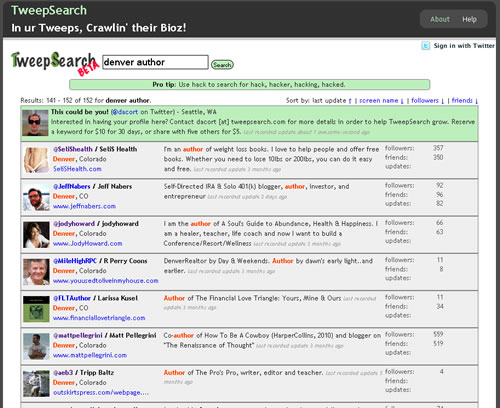
One of my big targets is helping book authors with their Internet strategies. And, if they’re in Denver where I live, I should absolutely be interested in connecting. So, I went to TweepSearch.com and searched for “denver” and “author.”
8 pages of profiles popped up on screen at 20 per page. I could see the word “author” in their bio so I would scan their basic description and consider if each was a potential target for future business.
Here are 3 very crucial discoveries I made after that point.
1) I didn’t want to connect with just everyone with the word “author” in their bio. TweepSearch gives you enough of the bio where you can really tell who you want to follow and who you don’t. Like, someone who has no posts is a red flag to me. They don’t even want to participate on Twitter, so why connect with them?
2) Posts from the person I was newly following began appearing immediately on my Twitter account page, so I was prompt to respond. And, this action almost always resulted in a return follow. I could just sit there and watch my followers number go up! Interaction and replying to other peoples’ posts is so crucial!
3) Anyone I saw that had nearly no posts/contributions to Twitter, I bypassed as well. These are people who are glad to receive a follow but are only promoting whatever is in their profile page or bio. Twitter is supposed to be to meet people and be interactive with them. You and I don’t have time to waste on those that don’t understand the idea of getting to know people using social media.
TweepSearch.com is really a tool everyone on Twitter should be using. But, I’ve only heard about now by searching specifically for a tool to help me search for keywords with peoples Twitter “bios.” Twitter’s main search feature only searches post content. Real-time search engines like Collecta.com also only search through post content.
But, when you and I are trying to network for potential leads, we need to search for peoples’ bio info by keywords. Give it a whirl and let me know how it works for you.
Calculate Number of Characters – Great for Twitter, Google AdWords
Posted by Marty Dickinson on Apr 30, 2009
Here’s a nice little script for those lazy moments where we just don’t want to open up MS Word or Open Office to dump our sentences into a document just to calculate the number of characters.
How to Get 2000 or More Followers on Twitter
Posted by Marty Dickinson on Apr 21, 2009
I’m not quite there yet, but by the end of the month, I surely will have 2000+ followers on Twitter. It took me a while to learn how the big boys Tweet and I think I’ve got it now. There are a few tools to use, a few things to automate, and a few tricks to get you ahead that not a lot of people are talking about. But, I’m going to divulge the secrets right here for you for free in thanks to all the people who have helped me for free with my own Twitter journey.
Here’s the summary of steps you will need to get 2000 or more followers on Twitter, beyond just the basics of setting up an account and without tweeting day and night hoping people miraculously follow you by the hundreds, because it just doesn’t work that way:
Get a free account at TweetLater.com – Certainly one of the most essential Twitter tools available, here you will be able to add a setting to automatically follow anyone who follows you as well as create automated posts ahead of time. Here’s a screenshot to show how a post is added and scheduled for delivery to Twitter in 5 steps.
1) Add a new Tweet
2) Shorten any long urls you might be pointing people to
3) Publish right now or
4) Set a specific time and date by clicking on the calendar image
5) Include distribution of your Tweets in your rss reader
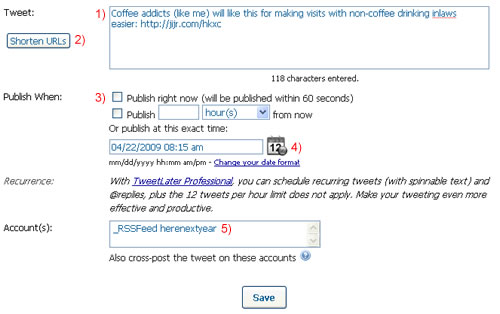
Tweet Later screen shot for adding a new Tweet automatically
Add a custom background (theme) to your Twitter profile – Every highly followed Tweeter I’ve come across has a custom background (also known as a theme) promoting their Web sites and products. Using default settings for Twitter backgrounds just looks like you’re not a seasoned Twitter user. Adding a custom theme increases Twitter followers all by itself by giving you the opportunity to show creativity while remaining professional
Plan for 3 sets of 5 Tweets minimum per day – You won’t have to do this forever. Remember, we’re just trying to get you to 2000 followers within a short amount of time. Use your TweetLater account to add scheduling Tweets so that you hit 3 different groups of people at different times throughout the day. I usually focus on the 8:30-10am, 2-4pm, and 8-10pm crowd.
You can post about several topics such as:
- Trade news
- Industry facts
- Links to tips and article pages (not on your Web site)
- Links to tips and article pages (on your Web site)
- Fun posts/attention grabbers
- Product reviews
- Web site reviews
- Questions.
Use IFollowBack.com – This free utility allows you to see profiles of Tweeters who agree to follow those who are willing to follow them. So, by simply going through one profile at a time, you can find people who you are interested in following or who might prove to be even potential customers for you. The prerequisite for being part of this rather secret program is that you have to be willing to follow others who choose to follow you.
Lots of people get hung up with this concept of “being followed.” I got an email once from a guy I followed and he literally said “Who are you and why did you choose to follow me?”
Geez! Pretty harsh ‘ay? Just goes to show that not everyone grasps what Twitter is really about. It’s about exposing yourself to a larger amount of people than you could ever meet for the same price FREE!
Use FriendOrFollow.com – This free tool allows you to see all the people you are following who are not following you. Sure, someone might follow you initially but they can “UNfollow” you anytime they want to. You will need to delete several unfollowers so that you have room to follow others while on your way to acquiring 2000 followers of your own (people following you).
I’ve been suggesting for a while now that using Twitter is a great way to get started on the Internet without spending a penny. If you use those five components together, you will be on your way to getting 2000 or more followers on Twitter.
Small Biz College Launches Today and Worth a Look
Posted by Marty Dickinson on Feb 2, 2009
So Darrell is finally launching what could be the largest business resource the web has ever seen, short of a search engine I suppose, but without all the garbage. I’ve been hearing about this project for months and was wondering if it would ever happen. Well, it not only happened, but it’s going to be publicized starting tomorrow morning in a very real way. Inside of a week, an estimated 500,000 will know of this new resource called the Small Biz College. I just hope their server doesn’t crash! Check it out at YourSmallBizCollege.com as it’s definitely worth a look.
Twitter Tools to Know and Love
Posted by Marty Dickinson on Jan 31, 2009
Twitter as a tool in itself is fascinating but the number of tools people are making to work with Twitter is completely staggering! Almost every day I hear of a new Twitter tool to help you conglomerate your tweets or link to some other social networking site. Here I will list all the Twitter tools as I discover them and provide a little explanation of them. Pick and choose what Twitter tools will help you the most.
Twtpwr.com Twitpwr.com (corrected) is Joel Comm’s program for rating your Twitter influence by monitoring the Twitter traffic you generate + users you refer + how much traffic THEY generate. Submit your url for tracking.
TwitterFall.com
Whirl.org is a desktop application to let you know if someone is Tweeting you without your having to visit Twitter.
Tweetdeck.com [My Favorite So Far] This tool is much more my style. It opens up to a full screen and shows your current Tweets, replies and direct messages in 3 separate columns. I can have Tweetdeck up all day on a separate screen and just occasionally scan through tweets–kind of like IM.
Twollow.com follows tweets for you by keyword sort of like how Google Alerts works.
TweetLater.com schedules tweets to hit peak times that your followers are online.
Twitterific is a widget for MAC’s that allows you to view and post tweets without the use of a web browser.
Digsby.com helps to manage all your social networks from one software.
Twinkle offers a way to manage tweets from your cell phone – tapulous.com/twinkle
Tweetie.com
Twitbacks.com helps you make a nice Twitter background for your profile free.
More coming for sure!
Squeaks in Camtasia Videos Fixed
Posted by Marty Dickinson on Nov 24, 2008
Last week I made a Camtasia video and sent it to a client. No problem. Camtasia worked just fine. Today, I started working on the instructional videos for our new HereNextYear member site (in soft launch…more about that later) and about every 5 seconds was this annoying little squeak that sounded like a really bad turntablist in a rap band pushing the record backwards to make the annoying squeak!
After a couple of hours of researching this, I finally come to find these squeaks are as a result of the new Flash player version 9. Apparently Camtasia videos do not play well with the version 9 of Flash Player. I must’ve just randomly clicked on a Windows update or something.
Anyway, if YOU use Camtasia for recording screenshots or live demos (still the greatest recorded presentation I know of), go watch this video and then you will find the free download link that will fix the problem.
Essentially, here’s how it works….
1. Download and install the SWFMP3Fixer program
2. Unzip it (I like the free CAMUNZIP) if you don’t have an unzip program
3. Open the .exe file that is displayed once you unzip the file from a folder
4. Drag one of your video files or folders into the box as I’ve done below
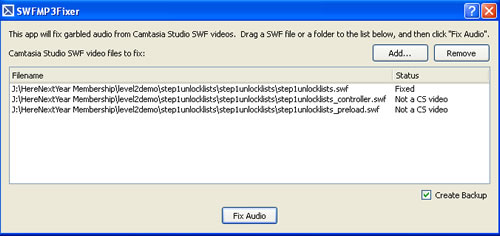
5. Click the Fix Audio button
From there, your video will be fixed and you’ll need to re-upload it to your website if that’s where you are hosting it.
Pretty simple…just took me a while to find the solution online. For all you Camtasia users, hope that helps a bit.
Or, you could of course just upgrade to version 6 of Camtasia where the fix is included.